
Top 10 Ranked NFL players of all time
0
0


A professional website helps small businesses explain services, attract potential customers, and make it easy for people to get in touch. But Wix, Squarespace, Shopify, and WordPress offer different approaches to design, content, online selling, and maintenance.
There is no universally best website builder. A local service provider may need bookings and a few clear pages; a retailer may need inventory, payments, fulfillment, and returns. This guide compares use cases and buying criteria; it does not claim to have completed hands-on tests or to provide a universal ranking.
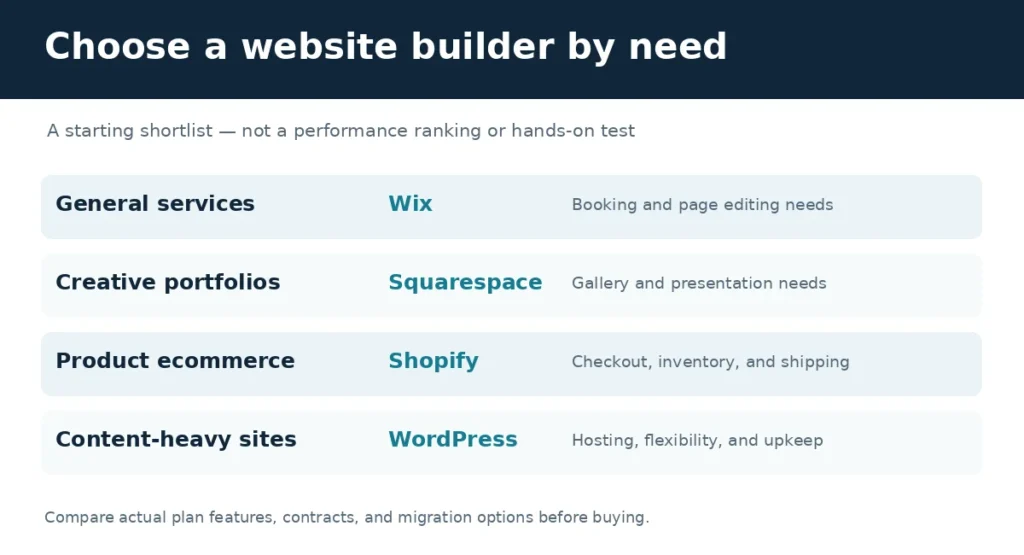
| Platform | Typical use case | Key consideration |
| Wix | General and service websites | Editing workflow and paid business features |
| Squarespace | Portfolio and design-forward websites | Templates and integrations |
| Shopify | Online product stores | Checkout, inventory and app costs |
| WordPress | Content-rich or custom websites | Hosting and maintenance responsibilities |
Evaluate editing ease, mobile layout, navigation, page speed, contact forms, analytics, and integration requirements. SEO controls should include editable page titles, meta descriptions, clean URLs, image alt text, internal links, indexing settings, and redirects. The available options may depend on the subscription plan.
For example, Wix’s official SEO Setup Checklist documentation describes a guided workflow for business information and keyword setup, plus eligible site connection to Google Search Console. Wix states that connecting this way requires a Premium plan and a connected domain.
Wix is a candidate for small service businesses that prefer a visual editing experience. Verify bookings, form submissions, custom domain use, and the exact plan needed for each feature. Build a demonstration page and test it on mobile before choosing.
Squarespace may fit photographers, designers, creative firms, and other businesses prioritizing consistent visual presentation. Test image galleries, forms, relevant integrations, content updates, and the terms for exporting or migrating a site later.
Shopify is designed around ecommerce. An online retailer should examine product variants, inventory management, payment methods, tax and shipping integrations, returns, and order administration. Compare the complete operating costs, including apps and payment-related fees, rather than the subscription alone.
WordPress is a candidate for a business that expects to publish a substantial content library or needs customized functionality. Hosting, security, plugin updates, backups, and technical support require explicit ownership, whether handled internally or through a managed provider.
No platform guarantees high Google rankings. Select a system that supports accurate, well-structured content and gives you control of basic technical settings. Google’s SEO Starter Guide emphasizes helpful content, understandable URLs, descriptive links, and relevant images with meaningful alt text. The actual site implementation matters more than a builder’s marketing claims.
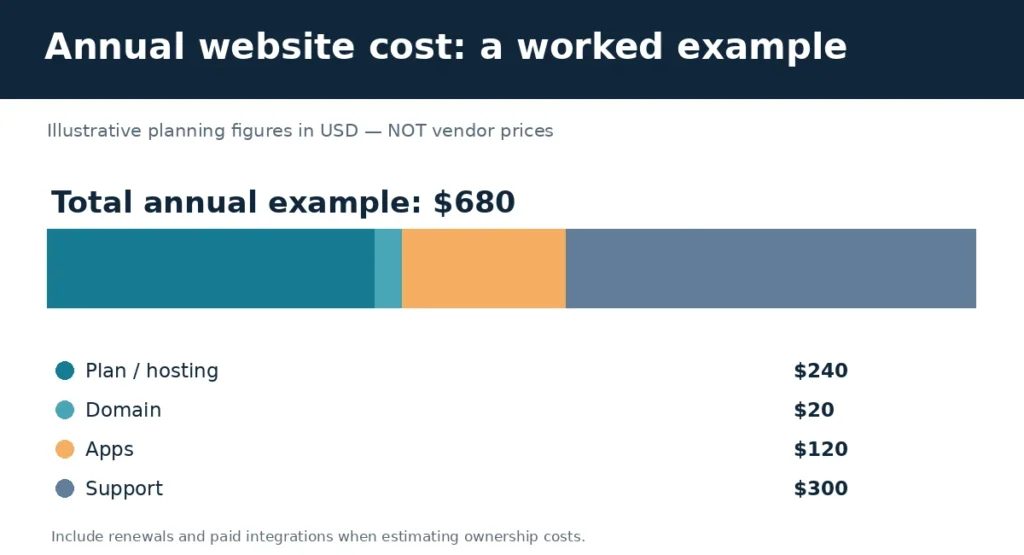
Budget for the subscription or hosting, domain renewals, paid apps, transaction fees, and support. As a purely illustrative example, a business might budget $240 annually for a plan, $20 for a domain, $120 for apps, and $300 for support. That totals $680 per year, before other operating expenses. These are hypothetical figures, not published prices of Wix, Squarespace, Shopify, or WordPress.
Create the same trial website on each finalist: homepage, service or product page, and contact form. Then edit titles and descriptions, check the mobile layout, review analytics options, and document upgrade requirements. Ask whether content and media can be moved if the business changes providers. Record the time and help required for each task before selecting a platform.
Avoid deciding based only on an introductory price, overlooking annual renewals, buying features nobody uses, or assuming that attractive templates automatically create strong search visibility. The right builder is the one that fits the business’s customer journey, management capacity, and total costs. Document actual workflow tests before publishing a definitive “best” ranking.
Yes. Multiple builders have visual workflows for standard business websites.
Shopify is a logical candidate; compare it with alternatives for the exact product and payment requirements.
Neither guarantees rankings. Assess features, content quality, implementation, and maintenance.
It can be useful for trials; review domain, payment, branding, and integration restrictions before launch.

Log in to support this story.
New here? Create an account


Discussion · 0 Comments
No comments yet — be the first to share your thoughts.